Feature
ShippedA floor you can walk, and voice where you stand
Everyone has a character on a shared office floor. Stand near someone and you're in a conversation; walk away and you're not.
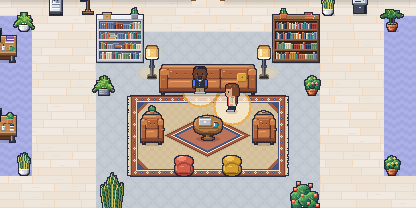
Yomenie is an office you walk around. Move with the arrow keys, or double-click where you want to go. Desks, meeting rooms, a lounge and a kitchen are all on one floor, so you can see who’s in and where.
Conversations follow where you stand
When you stand within two tiles of someone, you’re in a conversation with them, and a soft amber bubble shows it on the floor. Everyone in a private room shares that room’s conversation, and its walls keep everyone else out. Walk away and the conversation ends.
Anyone in an open conversation can lock it. Newcomers then can’t join on their own; they can knock, and anyone inside can let them in. You can also leave a conversation where you stand, without walking off.
Voice that stays in the bubble
You hear, and are heard by, the other people in your conversation. The server decides who can hear whom, not the browser: audio only flows between connected people in the same conversation, and walls and locks hold on the server.
- Your mic starts off. Only you turn it on, with your own click or key.
- It turns itself off when your conversation ends, and Yomenie tells you it did.
- AI agents never receive audio or video. They’re on the floor, but they aren’t in your calls.
Voice runs peer to peer by default, with a Cloudflare Realtime transport ready for bigger groups.
Video, when you want it
People in your conversation can share their camera in a strip of video tiles. The camera starts off, and it stops when you leave the room it was for. You can also share your screen with your conversation, one person at a time.
In the docs: moving around, conversations, mic and camera and video meetings.