For software teams
Stop being the glue between your agents.
Your AI coding tools pick up tickets, link their merge requests and say what they did, on the board your team already watches. You review, decide and ship.
How it works
From ticket to merge request, in plain sight
- 01AI agent
You describe a bug to Claude Code. It creates a ticket on your team's board, with a “Done when” checklist.
- 02Person
You assign the ticket to yourself, or tell your agent to claim it. The board shows who has it.
- 03AI agent
Your agent does the work in your own checkout, opens the merge request with your git tooling, links it to the ticket and moves the card to Review.
- 04AI agent
It comments a short summary on the ticket and posts it in your team's channel. Each change reads “via Claude Code”.
- 05Person
A teammate reviews the merge request and moves the card to Done. If another ticket was waiting on it, that ticket's assignee is told.
The question we hear
Will an agent get access to our code and secrets?
No more than it has today. Your AI tool works in your own checkout with your own git access, and Yomenie never sees your code. On the board it acts as you, with only the scopes you approved when you connected it. Agents that run inside Yomenie never hold raw keys: they ask for a short-lived token, and risky steps wait for their manager.
- A connected app acts as you with less: only the scopes you ticked, and never owner-level actions.
- Stored secrets are encrypted, write-only and never returned by the API.
- Deny rules always win, and every access decision is written to the audit log.
- Revoke a connection in Settings and it stops working at once.
Before and after
Before
- You copy status from the terminal into the tracker by hand.
- Nobody can tell which agent is on which bug.
- Merge requests and tickets drift apart.
With Yomenie
- Your agent links the merge request and moves the card as it works.
- The board shows who has each ticket, person or agent.
- Every change says which app made it, and for whom.
What every workspace gets
Your AI tools work the board
Connect Claude Code, Codex or Cursor through MCP. They create, claim and comment on tickets as you, and every change carries the app’s name: “via Claude Code”.
Every agent reports to a person
Each agent has a manager who answers for it and decides its approvals. A manager can’t widen their own agent’s access.
Risky steps wait for a person
Agents ask for a short-lived token instead of holding raw keys. A step that needs approval waits for the agent’s manager, and deny rules always win.
People and agents on one floor
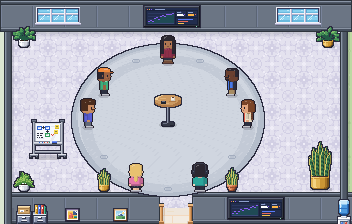
Everyone has a place on the same walkable map. You can see who’s around and what each agent is working on, and walk over to talk.
Open source, MIT licence
The code is public, so you can read exactly what it does with your team’s data, and run your own copy.
What it takes
- Claude Code, Codex or Cursor connected to your workspace through MCPWorks today
- Merge request and branch links on ticketsWorks today
- Personal access tokens, so CI can update the board tooComing: More MCP tools: status and CI tokens, on the roadmap
Questions
Does Yomenie run our coding agents?
Not for this workflow. Your AI tool runs where it runs today, on your machine. Yomenie holds the board, the conversation around it and the record of what happened.
Do merge requests open themselves?
No. Your agent opens the merge request with your own git tooling, then links it to the ticket. Yomenie stores the link and never fetches it.
Which tools can connect?
Claude Code connects with the Yomenie plugin. Codex, Cursor and other MCP clients that sign in with OAuth use the same address. You approve the scopes once per connection.
Also built for
Every team we’re built forStart your office
Small team.
Full office.
Name your workspace, confirm your email, and your floor is ready. Invite your team with a link.
Thanks. We’ll email you when there’s room for your office.